Cameras, lighting & rendering
Turn a Blender scene into an image or animation. Frame the camera, shape light and world illumination, choose a render engine and output settings, and carry rendered frames into a finished edit.
-
Cameras, lighting & rendering
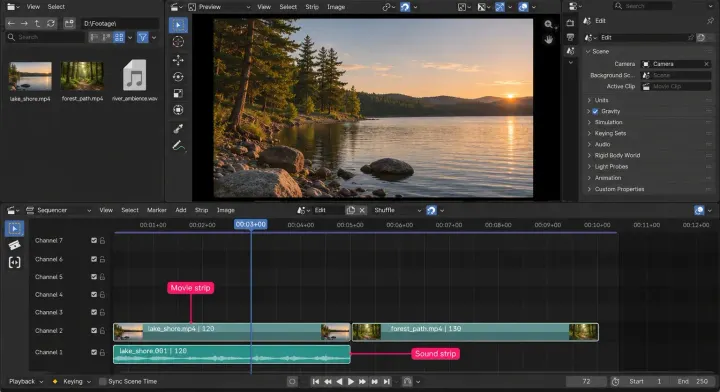
Blender as a video editor: what the Video Sequencer can and cannot do
Blender's Video Sequencer keeps 3D scenes live in the same file as your edit. Short edits fit well; high-resolution timelines need proxy and cache setup, while an audio-heavy project is easier in a dedicated editor.
-
Cameras, lighting & rendering
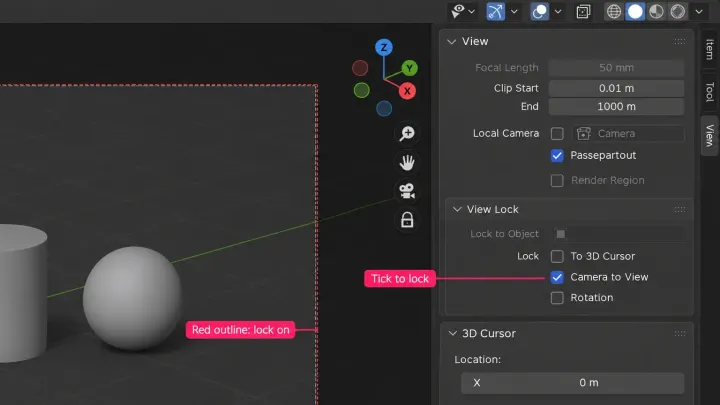
How to move the camera in Blender and line up a shot
Move the camera in Blender 5.2 LTS with G and R, snap it to the view you framed, steer it with Lock Camera to View or Walk, keep it on a subject with Track To, reset it when it strays, then check the shot through the camera and in a render.