Modeling
Build and edit Blender meshes, choose topology for the next change and keep modifiers editable until the shape is settled. Work through selection, mesh operations, scale, normals and modifier order with the model’s intended use in view.
-
Modeling
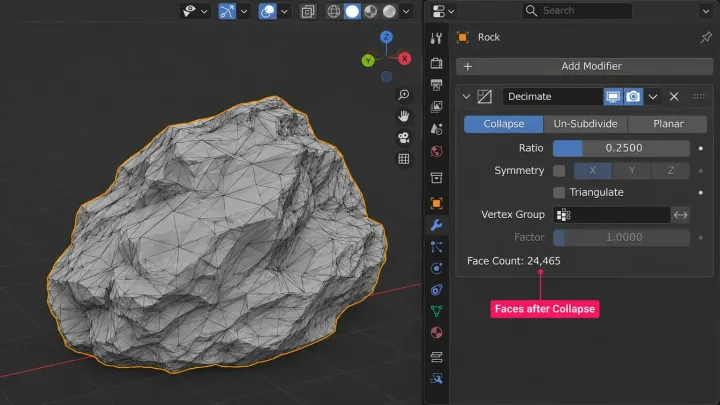
Blender Decimate: reduce polygons without wrecking the shape
Blender Decimate in 5.2 LTS: read the polygon count with the Statistics overlay, lower Ratio in Collapse mode, pick Un-Subdivide or Planar where they fit, protect regions with a vertex group, and know what happens to UV maps, shape keys and rigs before you apply, or reach for Remesh instead.
-
Modeling
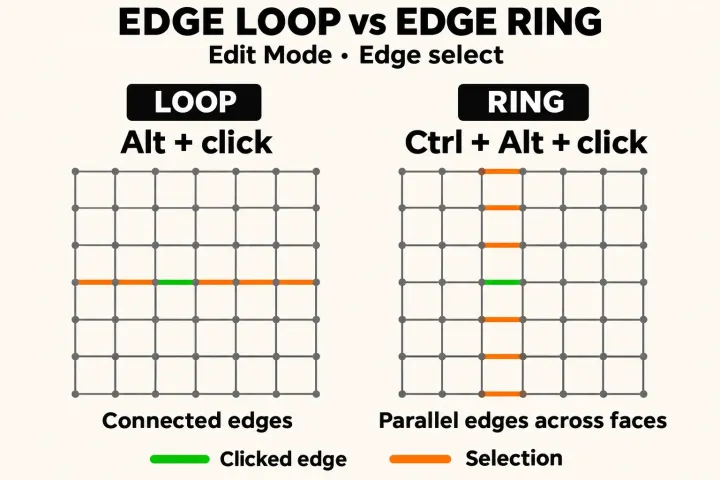
How to select an edge loop in Blender and why it sometimes stops
Alt-click, or Option-click on a Mac, selects an edge loop in Blender's Edit Mode; Shift-Alt-click toggles another and Ctrl-Alt-click takes the ring. Why a loop stops at poles, borders, hidden faces or Delimit, what to do when emulation or Linux takes Alt, and how to check the selected geometry.